Written by the AI Image Detector team · 12 min read · Last updated 2026-04-14 · Reviewed by our methodology team

What Is AI Image Detection?
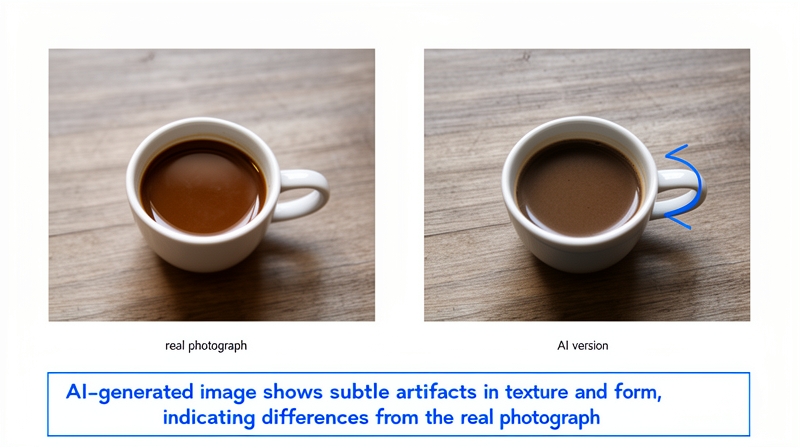
AI image detection is the process of analyzing a digital image to determine whether it was created by an artificial intelligence system — such as DALL-E 3, Midjourney v6, Stable Diffusion XL, or Adobe Firefly — or captured by a real camera. The technology uses deep learning models trained on millions of examples to identify subtle patterns and artifacts that are invisible to the human eye but reliably distinguish synthetic images from authentic photographs.
The demand for AI image detection has surged dramatically. Search volume for "AI image detector" has grown over 17% year-over-year, driven by the rapid improvement in AI-generated image quality and the growing prevalence of synthetic media across social platforms, news outlets, and e-commerce. What was once a niche research topic is now a critical tool for journalists, educators, businesses, and everyday internet users. You can try our free AI image detector to see the technology in action.
Why AI Image Detection Matters in 2026
The proliferation of AI-generated imagery poses serious challenges across multiple domains, and the stakes have never been higher. In 2026, the line between real and synthetic images has become nearly impossible to distinguish with the naked eye.
Misinformation and disinformation. AI-generated photos are increasingly used to create fake news stories, fabricate evidence, and fuel social media hoaxes. During election cycles, synthetic images of political figures in compromising situations can spread virally before fact-checkers can intervene. A reliable AI image detector is the first line of defense.
Fraud and identity theft. Fraudsters use AI-generated faces for fake profiles on dating apps, social media, and professional networks. Counterfeit product listings with synthetic images deceive consumers. Phishing schemes use AI-generated screenshots of banking interfaces to steal credentials.
Academic integrity. As AI image generators become accessible to students, educators face new challenges in art, photography, and design courses. AI image detection tools help maintain academic standards and ensure original work is properly credited.
Legal and forensic applications. Courts and law enforcement agencies are beginning to require authentication of photographic evidence. AI image detection is becoming a standard component of digital forensics workflows.
How AI Image Detectors Work: The Science
Modern AI image detectors rely on deep convolutional neural networks (CNNs) — the same class of models that powers image recognition in self-driving cars, medical imaging, and search engines. These networks are trained on large datasets containing both real photographs and AI-generated images, learning to identify subtle statistical patterns that distinguish synthetic content from authentic captures. For a deeper dive into the technical architecture, see our methodology page.
The training process works in two phases. First, during feature extraction, the network learns to identify low-level features (edges, textures, noise patterns) and high-level features (spatial relationships, semantic consistency) across millions of training images. Then, during classification, a fully connected layer maps these features to a probability score indicating how likely the image is to be AI-generated.
The result is a model that can detect artifacts and patterns that are completely invisible to humans — differences in how pixels relate to their neighbors, statistical anomalies in color distribution, and frequency-domain signatures unique to different AI generators.
The Four Core Detection Signals
While the internal workings of neural networks are complex, the key signals they analyze can be grouped into four categories. Understanding these helps you interpret detection results and understand why certain images are harder to classify. Our technical deep-dive covers each in more detail.
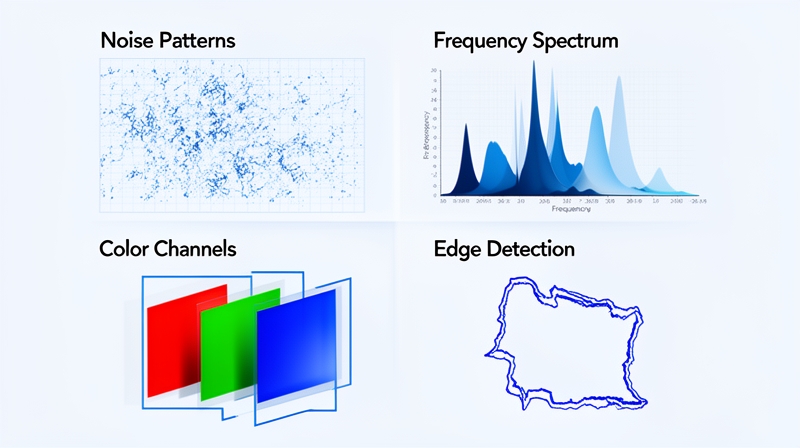
1. Noise pattern analysis. Every real camera sensor produces a unique noise signature — subtle random variations in pixel brightness caused by electronic interference and photon counting. AI generators produce different noise patterns: often too uniform, too structured, or statistically inconsistent with any known sensor. Detectors compare the noise profile of an uploaded image against expected distributions for real cameras.
2. Frequency domain analysis. When images are converted from spatial representation (pixels) to frequency representation (using Fourier or wavelet transforms), real photographs and AI-generated images show dramatically different patterns. AI images often lack certain high-frequency details or contain periodic artifacts in their frequency spectra that are absent in real photos.
3. Color channel correlation. In real photographs, the red, green, and blue color channels have specific statistical relationships determined by the optics and sensor design of the camera. AI generators don't perfectly replicate these correlations, leaving detectable signatures in the relationships between channels.
4. Edge coherence and texture analysis. AI generators sometimes produce subtle inconsistencies at object boundaries — slightly blurred transitions, texture repetition patterns, or geometric anomalies that differ from how real-world optics render edges. Modern detectors are particularly effective at identifying these micro-level artifacts.
How to Detect AI Images: Step-by-Step
Using an AI image detector is straightforward. Here is the process our tool follows when you upload an image for analysis:
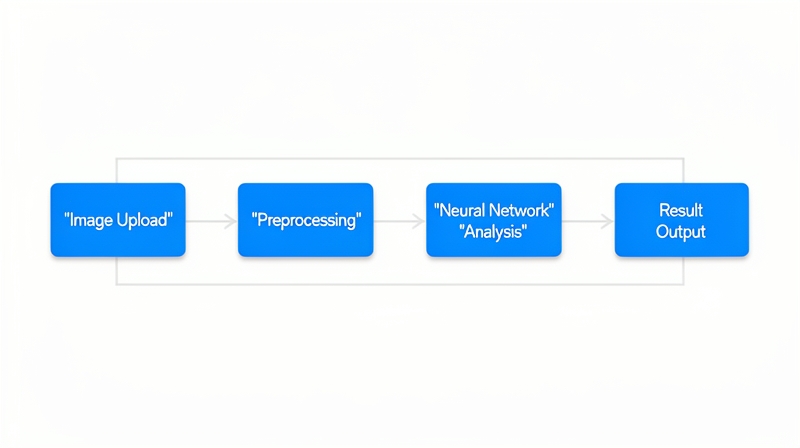
Step 1: Upload your image. Drag and drop or click to upload any image file. We support JPEG, PNG, WebP, GIF, and BMP formats up to 10MB. For best results, use the original file rather than a screenshot or re-saved copy.
Step 2: Preprocessing. The image is normalized — resized to a standard input dimension, color-balanced, and converted to the tensor format expected by the neural network. No image data is stored during this process (see our privacy policy).
Step 3: Neural network analysis. Our deep learning model analyzes the image across all four detection signal categories simultaneously. The model produces probability scores for both "real" and "AI-generated" classifications.
Step 4: Results. You receive a detailed verdict with confidence scores, a visual heatmap showing which regions triggered detection signals, and forensic metadata including noise pattern assessment, color consistency rating, texture analysis, and edge coherence score.
Limitations & Edge Cases
No AI image detector is perfect, and understanding the limitations helps you interpret results more accurately. We believe in transparency about what our technology can and cannot do — this is central to our commitment to honest AI analysis.
Heavy compression. Images compressed below JPEG quality 50 lose many of the subtle artifacts that detectors rely on. The compression process itself introduces noise that can mask both AI-generated and authentic image signatures.
Post-processing and editing. Images that have been heavily filtered, color-graded, cropped, or manipulated in photo editing software may produce less reliable results. The editing process can either introduce new artifacts or destroy the ones the detector needs.
Hybrid images. Images that combine AI-generated elements with real photographs (such as AI-enhanced backgrounds with real foreground subjects) present a challenge. The detector may return mixed signals reflecting both authentic and synthetic regions.
New generators. When entirely new AI architectures are released, there can be a brief window before detection models are updated to recognize their specific artifacts. We continuously retrain our models to minimize this gap.
Best Practices for Accurate Detection
To get the most reliable results from any AI image detector, follow these guidelines. These recommendations apply whether you are using our free detector or integrating detection via our API.
- Use the original file. Download the original image rather than taking a screenshot. Screenshots add compression, alter resolution, and can strip metadata.
- Upload the highest resolution available. Higher resolution images contain more signal for the detector to analyze. Upscaled or interpolated images may reduce accuracy.
- Check multiple sources for borderline results. If a result shows confidence between 40-60%, consider using additional detection tools for a second opinion. See our comparison of top AI image detectors.
- Consider the context. Detection results should be one input in your assessment, not the only one. Consider the source of the image, reverse image search results, and metadata analysis alongside detector output.
- Be aware of format effects. PNG images generally preserve more detail than JPEG. WebP can also retain good quality. If you have a choice, prefer lossless formats.
Who Uses AI Image Detection?
AI image detection serves a wide range of professionals and organizations who need to verify visual content authenticity.
Journalists and fact-checkers use AI image detectors to verify photos before publishing stories, particularly during breaking news events when misinformation spreads rapidly. Major news organizations have integrated detection into their editorial workflows.
Educators and academic institutions use detection tools to check student submissions for AI-generated imagery, maintaining academic integrity standards in art, photography, and design courses.
Businesses and marketers verify user-generated content, stock photos, and marketing materials to ensure authenticity. E-commerce platforms use detection to identify fraudulent product listings with AI-generated images.
Legal professionals and forensic analysts are increasingly using AI image detection as part of digital evidence authentication, particularly in cases involving visual evidence or intellectual property disputes.
Social media platforms integrate AI image detection at scale to label or flag synthetic content, helping users make informed decisions about the content they consume and share.
The Future of AI Image Detection
The relationship between AI image generation and detection is fundamentally adversarial — as generators improve, detectors must evolve in response. Several promising research directions are shaping the future of the field.
Multi-modal detection combines image analysis with metadata examination, reverse image search, and contextual signals (where the image was posted, account history, caption analysis) for more robust verification.
Watermark and provenance detection identifies invisible digital watermarks embedded by AI generators (such as those mandated by the EU AI Act) and verifies content provenance through standards like C2PA and Content Credentials.
Ensemble methods combine predictions from multiple specialized detection models — each trained on different generators or detection signals — to achieve higher overall accuracy and robustness.
Real-time detection is moving toward browser extensions and mobile apps that can flag AI-generated images as users scroll through social feeds, before misinformation has a chance to take hold.
For the latest updates on our detection capabilities, visit our methodology page or follow our research updates.
Frequently Asked Questions
Ready to detect AI-generated images?
Upload any image and get instant results — free, private, no signup required.
Try the AI Image DetectorAbout this guide: Written and maintained by the AI Image Detector team. Our detection methodology is developed by AI researchers with expertise in computer vision and digital forensics. We are committed to transparency in how our technology works. Have questions? Contact us. Read our terms of service and privacy policy.